Showing posts with label Research. Show all posts

Friday, August 28, 2015

Newseum: Free Primary Sources


I received information from edweb.net about it being Women Rights Day and to look at the free resources available on Newseum Digital Classroom regarding Women’s Suffrage Movement.   I was able to do some exploring and learned the site has a lot more to offer, free of charge.
The focus of the site is the First Amendment, but there are many articles about Journalism and topics Journalists have dealt with to impact society. (Berlin Wall, Watergate, etc.)
There is a video archive, an image library and also a few learning modules that feature specific topics. I also noticed a primary sources section featuring Civil War newspapers and images alongside the First Amendment information.
While it doesn’t offer as much information as some primary source sites, student working on a paper or a topic that needs reference to the First Amendment could use this as a great place to start.  

There is an opportunity to create an account for both students and teachers.  These are free accounts.  There is also an opportunity for students to submit work and do extension activities about the topics involved.

Tuesday, February 17, 2015

Finding Primary Sources Part 4

I am back to the topic of primary sources and have come across even more that can be used by many for research projects and papers.  All of them are free, some of them have a focus more International than National, so the opportunities are endless.

America in Class is a site established by the National Humanities Council.  The focus is primarily literature and history, but it also offers Professional Development.  The site links topics to the Common Core State Standards as well.  The site focuses on America from its beginnings to present time. The site also has a collection of secondary sources, such as essays and literature written by scholars.  It’s all free to use.

The National Endowment for the Humanities has started chronicling newspapers from all over the United States.  Users can access newspaper articles from every state in the US.  It is sorted by state and paper name.  It lists the oldest issue available as well as the number of issues available.  It’s free to use.


The Wilson Center Digital Archive features an international collection of documents that have been previously hidden from society. The browse themes and documents features send readers to clippings, maps and images about the topics available.  Users see a map with pins in specific areas.   The themes section leads users to many international topics.


Tuesday, February 10, 2015

Finding Primary Sources: Part Three

The last few posts have focused on Primary Sources for a paper.  Because I am such a nerd when it comes to research and I feel that the most accurate information is by far the best, I feel this topic is one to address over several posts.  I continue with three new places to visit to locate primary sources.

The Avalon Project:  Yale Law has established a large database dating back to the 4000 BC.  Most of the focus is historical and legal, but, it has a lot of materials that a classroom teacher can access.   You are going to find more documents in the 1800s and beyond, but there is a collection of material that can be used for a paper or project.

Spartacus Educational is a collection of documents about specific people and events throughout history. There are specific events listed in the database, but you can also connect to the Index and get a visual link to several topics, including the World Wars, General American History, British History and Biographies.  This site is developed by a Brit, so the text might be written with British flair, (for example, the History of Football isn’t what we American’s know as football, but soccer) it does covers a lot of information.


Fordham University has created a large database of full text sources that is accessible free of charge.  The content  includes a lot of information about Western Civilization, Religion, Revolutions both foreign and domestic.  When you find the topic of interest, you click it and it takes you to a large list of links that relate.  Some topics have hundreds of items available to use for research.   The information is both internal on Fordham’s site as well as external on the web.  Either way, it offers a lot of free information for a paper or research project.


Tuesday, February 3, 2015

Finding Primary Sources: Part Two

Last week, I posted a brief article about finding primary sources for free.   With the drive to go One to One in school and the push to back away from traditional textbooks, using digital primary sources is a fantastic way of getting the information you need online.

In part one, I mentioned the Library of Congress, The National Archives and DocsTeach.   Let's look at a few other sites to use for primary source searching.


First of all, Historypin.  History pin is Pinterest for primary sources.  It features a series of projects loaded with images from all over the world.  It's a global collection of materials that people don't normally see.   There are projects, basically tagboards, loaded with images that relate.  People add them to the community as a reference.  When the board is opened, a map appears and community members pin an image, document, etc, to the map.  It's a great idea, but it seems to be early in it's life cycle so it's continuing to grow.   I would recommend this for Middle School age students and up.  Some of the visuals may be difficult for a younger child to understand. (Holocaust, Genocide, etc.)

Second off, let's take a look at the Digital Public Library of America.   This site is a huge collection of images, documents and artifacts that anyone can access free. Per their website: "The DPLA  brings these different viewpoints, experiences, and collections together in a single platform and portal, providing open and coherent access to our society’s digitized cultural heritage." The site pulls information from libraries all over North America into one main location.   It is loaded with things are it seems to be fairly easy to use. It has an exhibitions tab that focus on a specific topic.  Within that exhibitions, users can see a large amount of information that pertains to a topic.  It's a great way to get a lot of information.


Finally, the Life Magazine Photo Archive.  Life Magazine's photo collection is by far one of the most vast photo collections out there with all sorts of images that can lead to writing prompts, research topics and even more. The page has been taken over by google, but the images are sorted by dates and as well as topics. They go back all the way to the 1860s. 


Tuesday, January 27, 2015

Locating primary sources: Part One

One of the goals of both teachers and school library media specialists is to help students locate sources for papers and primary sources are one of the best to offer a researcher.

There are several digital tools out there that help. 

First of all, the Library of Congress.  This site has an abundance of information about everything.  It is the largest online collection of everything from documents to images.  It is totally free and covers just about every subject you look for.  There are also external links to other sites controlled by the government, including the Library of Congress Card Catalog, The US Copyright office and the US Congress.  Because it's so large, you may find it a bit overwhelming to investigate, but, you will find primary sources to use for any paper or research you are doing.  The fact that it is free makes it all the while.

Second and Third, the National Archives and it's counterpart, DocsTeach. 

The National Archives features documents, genealogy and veteran's service records.  It is geared toward older students, perhaps grades 6 and up, but if students are working on a paper about genealogy, military history, and a focus on specific documents, this is the place to go.  Users can use an online database as well as research ancestory.  The site offers users a series of explanations about using the Archives and how to do research.  


DocsTeach features tools for teachers to provide students to encourage critical thinking and advanced research skills.  Both sites are free to use.  If you are in a district that is migrating away from textbook adoption and relying on personal creation of materials, this is a great place to go and find the materials you need.   The activities can be a bit more challenging.  Students younger than middle school will probably find it impossible to use. 


Friday, October 25, 2013

Citing sources Part 2: CiteThisForMe

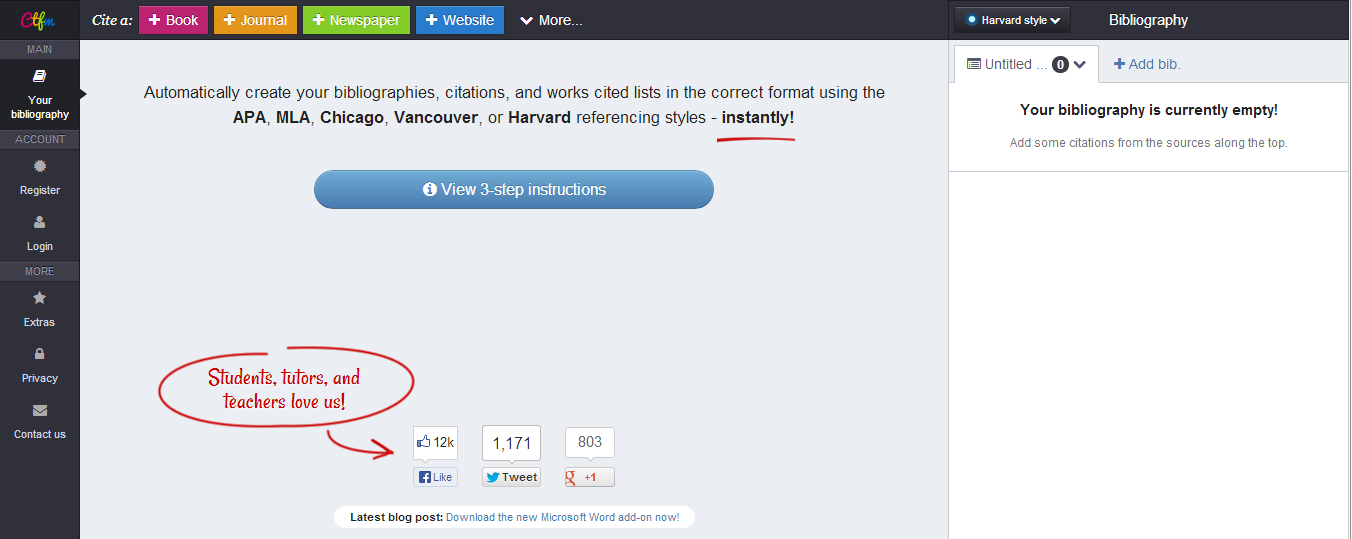
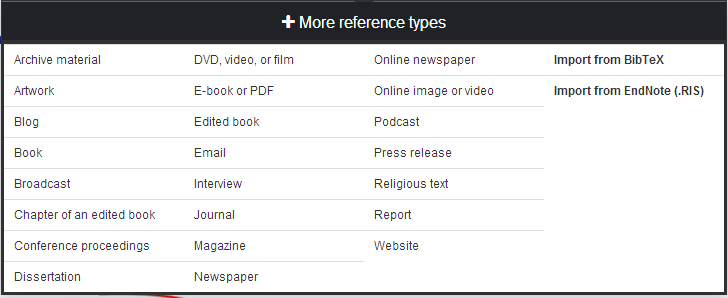
To wrap up my series on Citations, I end with a great, easy to use cite for citing sources and creating a personal bibliography- Cite This For Me


I learned about this site from a librarian on my PLN.  We were doing #TLCHAT one evening and someone asked a question about citations. The librarian mentioned sending students to this site to record their information for their papers.


I actually sent a few kids there recently and they found it very simple to use and easily accessible. Users go there and create a citation for their topics.  It generates a bibliography that is downloadable at the end.  The student I sent there was very unaware of how to do a citation, but after I sat with him and walked him through it, he seemed pleased with how easy it was to use.

 If you look at some of my screen shots, you will see how many different options there are for citation building.  It covers all of the major book types.

The site itself is visually appealing and easy to use. There are several options available to use for your paper.

After you create a bibliography you can access it on the site.   It is a very simple way to create your works cited page for a paper.

I encourage everyone to take a look at something such as CiteThisForMe as a way to organize and create an accurate works cited page.

Tuesday, October 22, 2013

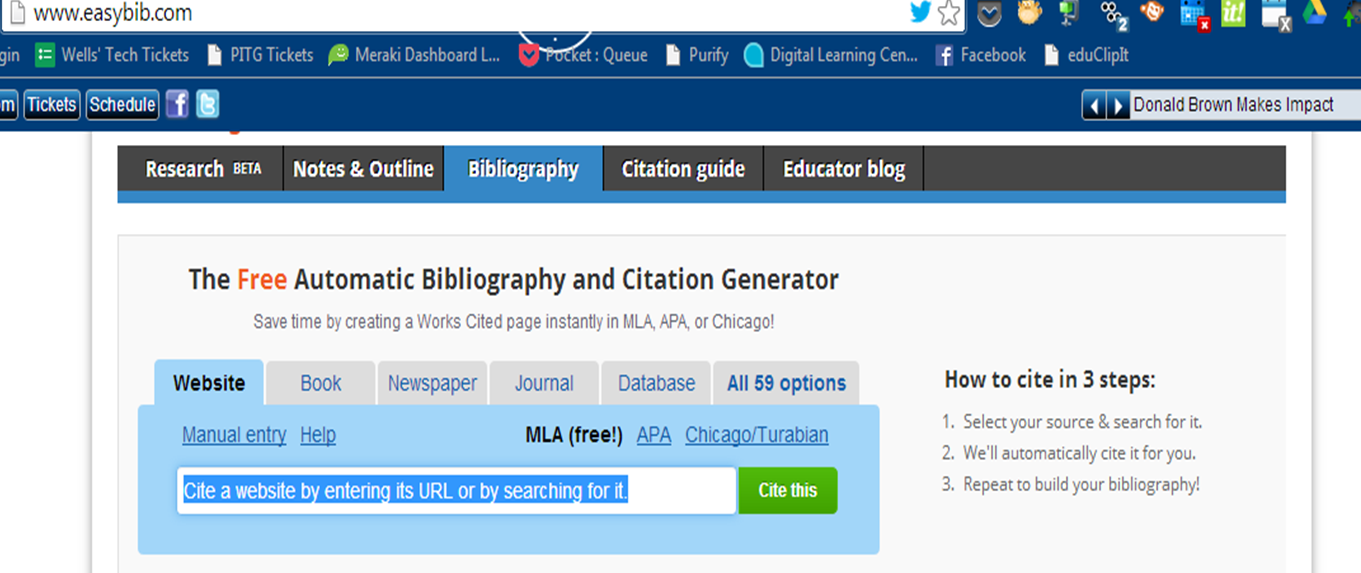
Citing sources Part 2: Easybib

To continue my series about citing sources, I am going to delve into the world of another online cite that assists the writer in the art of citation. (Yes, I call it an art because it takes talent to master the skill. Many of our students are lacking that skill and need to have it drilled and added to their brains more often than once a year.  It is a skill that needs to be adapted, utilized and practiced frequently.) My site today is:  Easybib.
I learned about Easybib a few years ago when I was teaching a senior project class which involved writing a super intense research paper.  I learned about it when I had my iPhone and someone told me to download the app and try it.  I did and I loved how it worked.  Scan a barcode and get the citation. Easy as that. 

I checked the website and found it just as easy to use.  It offers the researcher both guides to using a citation as well as offers ways to build the citation page.  It is very simple for the researcher.  

You merely decide the format *APA, MLA, etc. and plug in the information.   It does the work for you.  Is it going to teach kids what they need to know?  No, but, my thought about this is; who is going to sit down in real life and develop a citation based on the current MLA format?  Who is going to read through a guide and go step by step to build it when every database has the entire thing? I wouldn't.  If I had some of these wonderful sources to use when I was doing my numerous college papers, I would have absolutely taken advantage of it. 

With that being said, Easybib is just that- Easy!  It can do a lot to help the research process.  I also noticed it adds a special toolbar to Chrome to allow you to tag sites as you access them.  Talk about easy!

Friday, October 18, 2013

Citing sources Part 2: OSLIS


We are continuing our discussion of citations by looking at the Oregon School Library Information System website geared for elementary and secondary teachers and students.

My English teacher colleague grew up in Oregon and this site was highly regarded by the locals for its ease of use and factual information.  When she moved to Indiana, she brought the information with her and sends her students here to do their citations. It offers users a simple format to get started on a research process.  There is also a location to cite sources. Unlike the Purdue cite, OSLIS has it's own citation maker.

Users merely search for a specific format on the sitebar and input the necessary information.  Voila, you have a citation.  The hardest part here is training students to log the right information.  If we start them young, and continue the process, they will learn it and master it.

A few things to note, the graphics are a bit elementary.  I can already imagine a high school student telling you it's immature and such because the graphics are child like.   I just tell them the information is good and worthwhile so just use the site!

Next in the series: Easybib as a means of citing.

Tuesday, October 15, 2013

Citing sources Part 2: OWL

I am not sure how many people are familiar with Purdue University's Online Writing Lab, but, as a teacher in the Hoosier state, it is often a go to site for numerous teachers as students work on papers.   One would not really consider Purdue, a university known for Veterinary Science, Agriculture and Biology to be stellar in the area of English and citation, but this site is amazing.

The site has a lot of tools for the classroom teacher as well as updated information about style guides and formatting of a paper.  It allows for the user to get find up to date information about the different writing styles.   The site does not make the citation for you, but it teaches you the steps to make it correctly.

The tab for 7-12 teachers guides users through the writing process.  It has many links that relate to different writing topics to help get writers started. It also has an up to date MLA and APA writing style guide to get writers started in the research process.  There is also a very handy guide to avoiding plagiarism. I recommend if you are teaching the steps to research, you start kids here.  It is a great tool for the actual process of developing ones own works cited page and in text citations. If you teach the steps and train students to do the process on their own, this is the place to start.

In my next post in the Citation series:  OSLIS to do citations.

Friday, October 11, 2013

Citing sources Part 2: Citation machine

I have been requiring students to write papers of some sort for years.  I have required papers in French class, in library media class and in Journalism. All of which have required students to conduct research and develop citations.  The second phase of my Citing Sources series is going to talk about some of the different websites students and teachers can use to cite information. There are many of them out there, but only a few of them are used by myself and staff members at my school so those will be my focus.


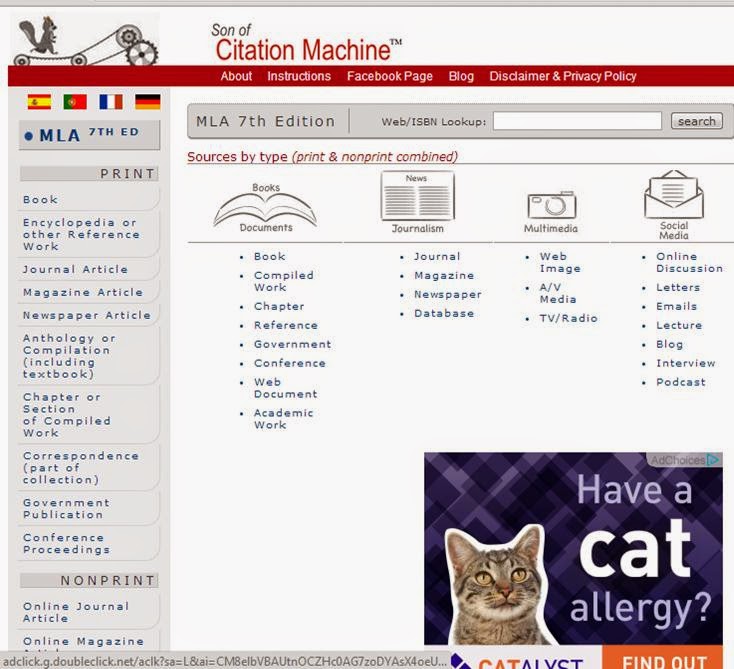
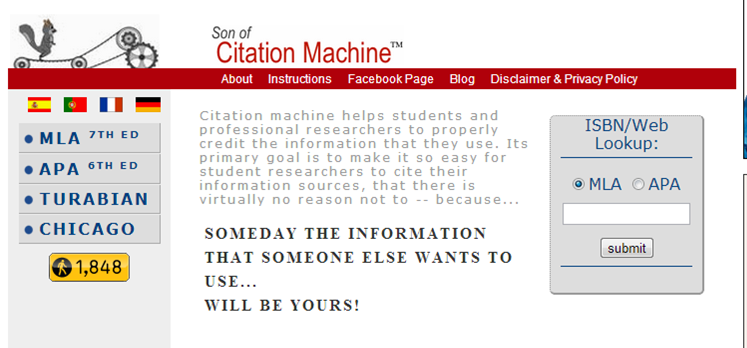
Let's start, first of all with Citation Machine.  I have relied on this site for a very long time.  I was introduced to it about 5 years ago by it's developer David Warlick.  I started using it that following semester with my students in Journalism when they wrote their papers about the history of Journalism.

Citation Machine is very simple to use and it covers the basic types of paper styles, MLA, APA, Turabian and Chicago.  It offers users a large amount of sources.  It doesn't take much to get the information needed either.  It even allows the user to plug in the ISBN of a book and choose APA or MLA and voilà, there is the citation.

Yes, using a site like this isn't going to help kids learn how to cite sources on their own, but, it does it correctly.  Some English teachers go through the process, show kids how to do it on their own and then have them check their citations with sites like this.  As a non English teacher, this is the logical way for me to get kids to do their citations.

There is so much available information for kids to access and so many things they can do to make their papers correct.  It's a no brainer!

Next in the series: OWL, the Purdue learning lab to cite sources.

Friday, May 24, 2013

Did you know this about Google?

I consider myself pretty tech savvy and I consider myself a pretty good researcher but sometimes a site I use often makes a change and it makes it hard to go back to somewhere I was prior. The Indiana DOE site went through a lot of changes over the years and often I came across a document I needed and couldn't find it again because the bookmark had changed.  Google has a fix for that.

If one wants to find something from a specific site, typing the information in the query box along with a specifications formula will bring back the documents from that specific site that one was looking for.  Here is an example: hoosier reader site:  http://www.doe.in.gov  click go and your results should be specific.


I am thinking this has the potential of being a good 10 minute staff pd on a tech Tuesday.  A lot of colleagues would save time doing their searches that way.

Tuesday, May 21, 2013

Google searching tips part one

Being a school library media specialist, I often have a cringe cross over me when a student is told to just google something and go with it.  Using google is the common go to method for research and often it is done incorrectly.   Knowing how to google right might take that cringe away from me.

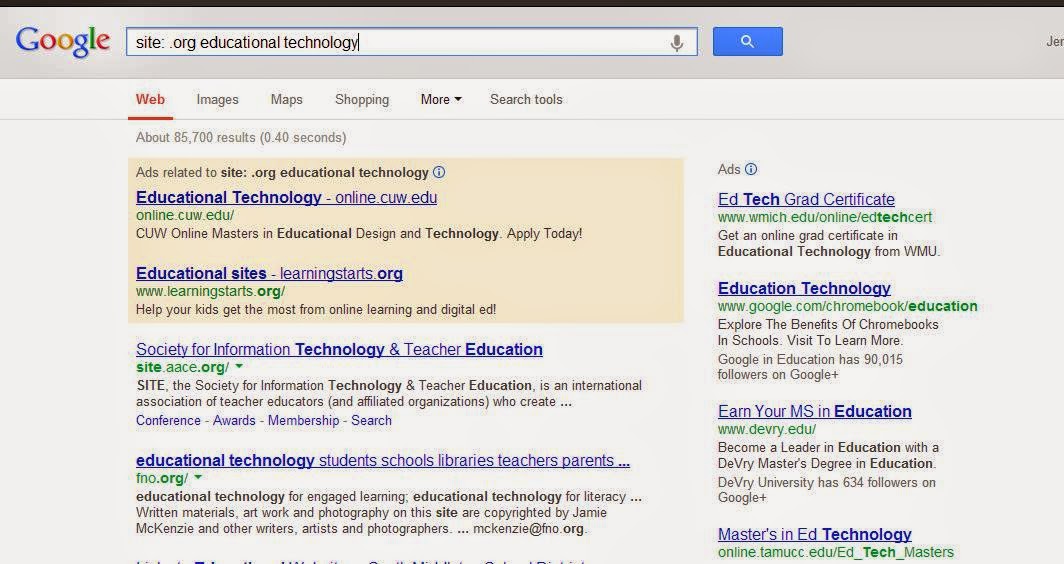
First off... site searches. Google allows users to input a specific site format in the query box. Instead of getting back all of the sites from .com to .gov, I can specify in the query box what site type I want. If students have to Google for their information, guiding them to use the site specific search makes it a little better. Here's how it works:  in the query box, type site: [site type] and the keywords.  Let's look at an example:  I want to know about educational technology and organizations that deal with it.  So... site: .org educational technology. Click go and the return are just articles and sites with .org in them that relate to the specific topic.


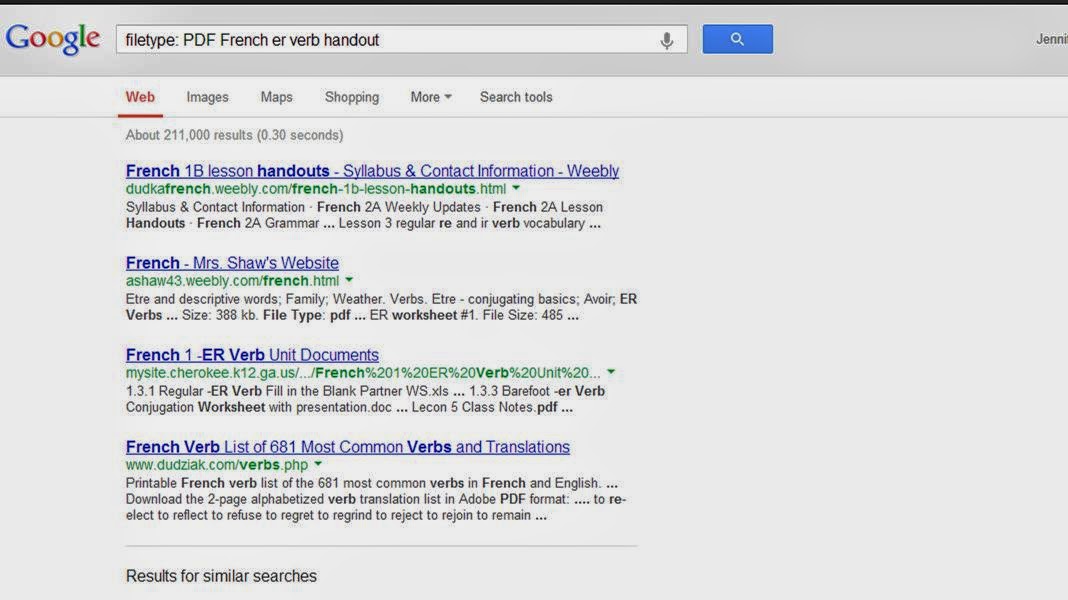
The same goes for file type. Often, when I teach French class I want to find a document to use as a reference or find something in creative commons for the kids to use as an additional tool. By doing a filetype query,  I can get documents back that aren't a mix match of things. Here are some examples:  in the query box type filetype: [format of choice] and the item.  It looks like this: filetype PDF French er verb handout. The results that jet back will only be in PDF format.


I have decided my goal as an LMS is to guide kids to look for items in Google the right way and not just generally.  I think my cringe will go away if students are guided to google in the right direction.

Tuesday, July 31, 2012

findingDulcinea to do research

Being a school librarian, I am often asked by both students and teachers alike ways to find materials to use for papers, speeches or even extra credit.  That is my job as a media specialist, to teach and help people sift through information and help people decide what is good and what is bad.  I came across a site called findingDulcinea, which according to the site is the librarian of the Internet.  It is used to teach people how to find good materials and information instead of having to sift and sort through thousands of websites.

In today's age, people automatically go to google to get their information.  Even I am guilty of googling something that I want to learn about fast, but, often, the information  isn't always credible enough to use for research or an accurate paper. Dulcinea offers viewers information about different search engines and alternative sites to use for  accurate and relevant information.

A database can cost a school district thousands of dollars.  Books are often outdated as soon as they arrive in the library. Using Dulcinea can teach patrons how to locate their materials through content specific web guides. Each guide has different tools for the learner.  The main page offers top stories and articles where patrons can start their journey.

Dulcinea has a sweet search engine, as it is called, directed for students.  Every website in the mix has been evaluated by educators for relevance and information. Within the search engine, there are a few content specific sites as well- Social Studies, Biographies and an educator site to teach skills to teachers.

My corporation has a few database subscriptions that have not been used but maybe a few times.  I am thinking of adding this as a potential site to obtain information and cancel my databases.  The money we spend on those databases could be used for something else we need, like maybe ebooks!  I am really glad I came across this site.  I am thinking it could do a lot to benefit my kids.