Being that I am at the end of the school year and things are beyond hectic, here is an archive regarding CLEAR tools. More to come next week.
For part three of my CLEAR tools, I decided to talk about the video dropbox.
If you read my post about the audio dropbox, you will know how easy these tools are to use. Merely create an account, login and go. You embed the dropbox into a website or Edmodo and voila, kids can record anything right off the bat. The fact that the teacher can set a time limit on the dropbox also helps
I used this a few times last year to record short skits in my French class but I think the tool could be used for so much more.
My school is a 1:1 school. All students have a device with a webcam. I can see a video dropbox being used for oral history reports, weather reports, broadcasts, and presentation.
The one disadvantage to the CLEAR tools is the teacher has the account and the final product is only accessible to the teacher. It would be hard to use it as a collaboration tool or to share information online with others. (Perhaps a presentation to sister school or something.)
Take a look at it, if you are in a district with webcam capable devices, it could really work for you.
Showing posts with label Foreign Language. Show all posts
Friday, June 7, 2013
Tuesday, June 4, 2013
From the Archives: CLEAR RIA Audio Dropbox
Part two of my trip to the Archives with CLEAR tools...
As I mentioned in an earlier post, the CLEAR (MSU language research center) has developed a plethora of tools to use for the language classroom as well as for teacher who need students to do interactive learning. I don't think a language or ESL teacher are the only ones who would benefit from the services.
I decided I would start your journey with these tools with the easiest one to use: the Audio Dropbox. I have used the Audio Dropbox for about three years now. I embedded it into all of my websites and also into edmodo. (Yes, it can be embedded into your edmodo library and used over and over again!)
The dropbox is simple to use. You start off creating an account at the CLEAR RIA website once you do that, you are asked to jump to a page. Where you see some places to make folders or dropboxes. I made one dropbox per class so I don't have to constantly embed different dropboxes, but if you wanted to, you could set it up for each class and have specific boxes for each chapter or each project. It is really dependent on what you are planning to do.
I assign the kids various speaking activities and they record them directly into the dropbox. I log into my account and grade them. I notate into a rubric and send it directly to the kids. It's a great way to share their grades with them as well as tell them the things they are stuggling with. After the nine weeks ends, I delete the files and start over again.
I do have a few recommendations. Embed the link into edmodo or the edmodo library. If you put it on a website, kids get confused about the different dropboxes and accidentally record into the wrong one.
One great thing about the CLEAR RIA, you do have a documentation sheet with each site that explains how it works and how to use it. Take a little time and check this site out. It's really easy to use and can do a lot for your classroom.
As I mentioned in an earlier post, the CLEAR (MSU language research center) has developed a plethora of tools to use for the language classroom as well as for teacher who need students to do interactive learning. I don't think a language or ESL teacher are the only ones who would benefit from the services.
I decided I would start your journey with these tools with the easiest one to use: the Audio Dropbox. I have used the Audio Dropbox for about three years now. I embedded it into all of my websites and also into edmodo. (Yes, it can be embedded into your edmodo library and used over and over again!)
The dropbox is simple to use. You start off creating an account at the CLEAR RIA website once you do that, you are asked to jump to a page. Where you see some places to make folders or dropboxes. I made one dropbox per class so I don't have to constantly embed different dropboxes, but if you wanted to, you could set it up for each class and have specific boxes for each chapter or each project. It is really dependent on what you are planning to do.
I assign the kids various speaking activities and they record them directly into the dropbox. I log into my account and grade them. I notate into a rubric and send it directly to the kids. It's a great way to share their grades with them as well as tell them the things they are stuggling with. After the nine weeks ends, I delete the files and start over again.
I do have a few recommendations. Embed the link into edmodo or the edmodo library. If you put it on a website, kids get confused about the different dropboxes and accidentally record into the wrong one.
One great thing about the CLEAR RIA, you do have a documentation sheet with each site that explains how it works and how to use it. Take a little time and check this site out. It's really easy to use and can do a lot for your classroom.
Friday, May 31, 2013
From the Archives: CLEAR RIA tools
Since it is the end of the year and crazier than ever, my next three posts will be about CLEAR RIA tools...
As a foreign language teacher, I am often introduced to tools and techniques at conferences that are not normally shared with teachers outside of the foreign language realm. Some of the tools available are really fantastic for the language teacher, but, those outside the language box can also benefit from the tools. Michigan State University's CLEAR (Center for Language Education and Research) is one such place. CLEAR has a large assortment of what they cal RIA tools which are awesome ways to have students complete oral and video tasks. I am going to take the next few blog posts to talk about the tools I use in my classroom and some of the advantages of them. Check out the site, especially if you teach classes that require students to interact, respond and do speaking or video tasks. The site also allows you to link to YouTube, TeacherTube and SchoolTube videos or upload your own. They can be modified to meet your needs in the classroom.
The first thing to do, is take a look at the CLEAR site and look at some of the options available. The site to check, is the RIA site. These are Rich Internet Activities. I use them at least twice a week, especially the audio dropbox. The tools can be embedded into a website, including Edmodo.
There are also webinars and white papers. Some of them are not for everyone, a majority are geared primarily for the language teacher, but something there might be of interest to a different content area. There are assessment tools, a quiz break, just to name a few. Look around the site, I will be posting about some of the cool RIA tools in the next few posts.
As a foreign language teacher, I am often introduced to tools and techniques at conferences that are not normally shared with teachers outside of the foreign language realm. Some of the tools available are really fantastic for the language teacher, but, those outside the language box can also benefit from the tools. Michigan State University's CLEAR (Center for Language Education and Research) is one such place. CLEAR has a large assortment of what they cal RIA tools which are awesome ways to have students complete oral and video tasks. I am going to take the next few blog posts to talk about the tools I use in my classroom and some of the advantages of them. Check out the site, especially if you teach classes that require students to interact, respond and do speaking or video tasks. The site also allows you to link to YouTube, TeacherTube and SchoolTube videos or upload your own. They can be modified to meet your needs in the classroom.The first thing to do, is take a look at the CLEAR site and look at some of the options available. The site to check, is the RIA site. These are Rich Internet Activities. I use them at least twice a week, especially the audio dropbox. The tools can be embedded into a website, including Edmodo.
There are also webinars and white papers. Some of them are not for everyone, a majority are geared primarily for the language teacher, but something there might be of interest to a different content area. There are assessment tools, a quiz break, just to name a few. Look around the site, I will be posting about some of the cool RIA tools in the next few posts.
Friday, November 16, 2012
CLEAR RIA tools: Conversations
To continue my chat about CLEAR RIA tools, we have to talk about the conversation one. So often, foreign language teachers have to assess lots of kids with just a little bit of time. I have some classes where I am spread thin and not able to meet each child several times during the duration of the class, especially if I am differentiating and helping someone who is confused about a step.
Conversations allows the teacher to record a series of questions and embed them into a website for students to respond to orally. It is a super easy tool to use and I don't think it has to be used solely for the foreign language classroom. I can see success with this in a variety of classes. In a Social Studies class, students can use oral responses for a portion of an assessment. Special education students who rely on dictation as a means of testing can respond orally. A speech teacher can strike an impromptu speech showing students an image or a question. The ideas go on and on.
I am going to use it to get my French One students to talk about the weather. The time setting it up may be a little more lengthy than a normal assignment, but as I do it annually, it can be recycled. Check it out. You may find something to do with the software.
Conversations allows the teacher to record a series of questions and embed them into a website for students to respond to orally. It is a super easy tool to use and I don't think it has to be used solely for the foreign language classroom. I can see success with this in a variety of classes. In a Social Studies class, students can use oral responses for a portion of an assessment. Special education students who rely on dictation as a means of testing can respond orally. A speech teacher can strike an impromptu speech showing students an image or a question. The ideas go on and on.
I am going to use it to get my French One students to talk about the weather. The time setting it up may be a little more lengthy than a normal assignment, but as I do it annually, it can be recycled. Check it out. You may find something to do with the software.
Tuesday, November 13, 2012
CLEAR RIA tools: Viewpoint embeddable videos
Being a foreign language teacher, the need to use videos is often very necessary in the classroom. With all of the talk of flipping classrooms and using video for instruction, the need grows for many educators. CLEAR from MSU has a program for videos called Viewpoint. You can actually record video, audio and embed it directly into your school website or into Edmodo (and probably My Big Campus too). One thing I like is the fact that our school does not block these video streams. Since they are directly coming from CLEAR, my school doesn't block it. It saves a lot of time with the process to unblock websites for classroom use.
The program has a few options for you. First of all, you can record a video with a camera and upload it to the site. You can also record directly onto the site. There are places to make a collection of videos as well. You can also add your students to the site and have them respond and upload video.
It's something different to do in class and with so many people starting to talk about the flip, it might be a way to do it successully.
The program has a few options for you. First of all, you can record a video with a camera and upload it to the site. You can also record directly onto the site. There are places to make a collection of videos as well. You can also add your students to the site and have them respond and upload video.
It's something different to do in class and with so many people starting to talk about the flip, it might be a way to do it successully.
Friday, November 9, 2012
CLEAR RIA tools: Revisions
Do you have your students do writing assignments in the target language you teach or in English, Social Studies, Science etc? MSU CLEAR has established a tool that allows students to peer edit online. The cool thing about the program, it also allows kids to record audio and add it to the file. I spent a little time experimenting with it to see how I can use it in my class and I already have a few projects in mind.
First off, you have to have a CLEAR account. You open Revisions and create classes. (Don't worry, there is a series of mini tutorials to help you get started.) Invite your students to the classes. They join, you add them and they accept the class. From here on, you get to work.
There are tabs available for each class and here, you add assignments. I decided to do a short writing assignment and sample the program. It's awesome. Each student can type/ record their thing and then they can edit each other's work. The teacher can see a revision list with who does what. It is easy. I have used one note before and this program reminds me a little of one note, but, I think the teacher has more control of the actual outcome.
I tried using it a little last year and had my students work with poetry. They translated a piece and then read it aloud onto the computer. It was easy to do and to grade. I recommend it to anyone.
First off, you have to have a CLEAR account. You open Revisions and create classes. (Don't worry, there is a series of mini tutorials to help you get started.) Invite your students to the classes. They join, you add them and they accept the class. From here on, you get to work.
There are tabs available for each class and here, you add assignments. I decided to do a short writing assignment and sample the program. It's awesome. Each student can type/ record their thing and then they can edit each other's work. The teacher can see a revision list with who does what. It is easy. I have used one note before and this program reminds me a little of one note, but, I think the teacher has more control of the actual outcome.
I tried using it a little last year and had my students work with poetry. They translated a piece and then read it aloud onto the computer. It was easy to do and to grade. I recommend it to anyone.
Tuesday, November 6, 2012
CLEAR RIA tools: The Video Dropbox
For part three of my CLEAR tools, I decided to talk about the video dropbox.
If you read my post about the audio dropbox, you will know how easy these tools are to use. Merely create an account, login and go. You embed the dropbox into a website or Edmodo and voila, kids can record anything right off the bat. The fact that the teacher can set a time limit on the dropbox also helps
I used this a few times last year to record short skits in my French class but I think the tool could be use
d for so much more.
My
school is a 1:1 school. All students have a device with a webcam. I can see a video dropbox being used for oral history reports, weather reports, broadcasts, and presentation.
The one disadvantage to the CLEAR tools is the teacher has the account and the final product is only accessible to the teacher. It would be hard to use it as a collaboration tool or to share information online with others. (Perhaps a presentation to sister school or something.)
Take a look at it, if you are in a district with webcam capable devices, it could really work for you.
If you read my post about the audio dropbox, you will know how easy these tools are to use. Merely create an account, login and go. You embed the dropbox into a website or Edmodo and voila, kids can record anything right off the bat. The fact that the teacher can set a time limit on the dropbox also helps
I used this a few times last year to record short skits in my French class but I think the tool could be use
d for so much more.
My
school is a 1:1 school. All students have a device with a webcam. I can see a video dropbox being used for oral history reports, weather reports, broadcasts, and presentation.
The one disadvantage to the CLEAR tools is the teacher has the account and the final product is only accessible to the teacher. It would be hard to use it as a collaboration tool or to share information online with others. (Perhaps a presentation to sister school or something.)
Take a look at it, if you are in a district with webcam capable devices, it could really work for you.
Tuesday, October 30, 2012
CLEAR RIA tools: The Audio Dropbox
As I mentioned in an earlier post, the CLEAR (MSU language research center) has developed a plethora of tools to use for the language classroom as well as for teacher who need students to do interactive learning. I don't think a language or ESL teacher are the only ones who would benefit from the services.
I decided I would start your journey with these tools with the easiest one to use: the Audio Dropbox. I have used the Audio Dropbox for about three years now. I embedded it into all of my websites and also into edmodo. (Yes, it can be embedded into your edmodo library and used over and over again!)
The dropbox is simple to use. You start off creating an account at the CLEAR RIA website once you do that, you are asked to jump to a page. Where you see some places to make folders or dropboxes. I made one dropbox per class so I don't have to constantly embed different dropboxes, but if you wanted to, you could set it up for each class and have specific boxes for each chapter or each project. It is really dependent on what you are planning to do.
I assign the kids various speaking activities and they record them directly into the dropbox. I log into my account and grade them. I notate into a rubric and send it directly to the kids. It's a great way to share their grades with them as well as tell them the things they are stuggling with. After the nine weeks ends, I delete the files and start over again.
I do have a few recommendations. Embed the link into edmodo or the edmodo library. If you put it on a website, kids get confused about the different dropboxes and accidentally record into the wrong one.
One great thing about the CLEAR RIA, you do have a documentation sheet with each site that explains how it works and how to use it. Take a little time and check this site out. It's really easy to use and can do a lot for your classroom.
I decided I would start your journey with these tools with the easiest one to use: the Audio Dropbox. I have used the Audio Dropbox for about three years now. I embedded it into all of my websites and also into edmodo. (Yes, it can be embedded into your edmodo library and used over and over again!)
The dropbox is simple to use. You start off creating an account at the CLEAR RIA website once you do that, you are asked to jump to a page. Where you see some places to make folders or dropboxes. I made one dropbox per class so I don't have to constantly embed different dropboxes, but if you wanted to, you could set it up for each class and have specific boxes for each chapter or each project. It is really dependent on what you are planning to do.
I assign the kids various speaking activities and they record them directly into the dropbox. I log into my account and grade them. I notate into a rubric and send it directly to the kids. It's a great way to share their grades with them as well as tell them the things they are stuggling with. After the nine weeks ends, I delete the files and start over again.
I do have a few recommendations. Embed the link into edmodo or the edmodo library. If you put it on a website, kids get confused about the different dropboxes and accidentally record into the wrong one.
One great thing about the CLEAR RIA, you do have a documentation sheet with each site that explains how it works and how to use it. Take a little time and check this site out. It's really easy to use and can do a lot for your classroom.
Friday, October 26, 2012
Using CLEAR RIA tools Part One
As a foreign language teacher, I am often introduced to tools and techniques at conferences that are not normally shared with teachers outside of the foreign language realm. Some of the tools available are really fantastic for the language teacher, but, those outside the language box can also benefit from the tools. Michigan State University's CLEAR (Center for Language Education and Research) is one such place. CLEAR has a large assortment of what they cal RIA tools which are awesome ways to have students complete oral and video tasks. I am going to take the next few blog posts to talk about the tools I use in my classroom and some of the advantages of them. Check out the site, especially if you teach classes that require students to interact, respond and do speaking or video tasks. The site also allows you to link to YouTube, TeacherTube and SchoolTube videos or upload your own. They can be modified to meet your needs in the classroom.
The first thing to do, is take a look at the CLEAR site and look at some of the options available. The site to check, is the RIA site. These are Rich Internet Activities. I use them at least twice a week, especially the audio dropbox. The tools can be embedded into a website, including Edmodo.
There are also webinars and white papers. Some of them are not for everyone, a majority are geared primarily for the language teacher, but something there might be of interest to a different content area. There are assessment tools, a quiz break, just to name a few. Look around the site, I will be posting about some of the cool RIA tools in the next few posts.
The first thing to do, is take a look at the CLEAR site and look at some of the options available. The site to check, is the RIA site. These are Rich Internet Activities. I use them at least twice a week, especially the audio dropbox. The tools can be embedded into a website, including Edmodo.
There are also webinars and white papers. Some of them are not for everyone, a majority are geared primarily for the language teacher, but something there might be of interest to a different content area. There are assessment tools, a quiz break, just to name a few. Look around the site, I will be posting about some of the cool RIA tools in the next few posts.
Friday, October 5, 2012
It's a tough time flipping a class
Back in July I announced to my readers that I was flipping my class. Sorry to say but time is not on my side to do this. I started placing files per chapter into a one note document that I shared with my class but I came across some downfalls. First of all, Microsoft only allows a certain number of people to create a skydive account with the same IP address. This makes account creation an absolute nightmare when a portion of the class lives in an Internet free environment. Yes I have kids without Internet access! In one class alone four of the 12 have no Internet. Mostly because the only options are very slow dial-up.
I tried having a few a day set up accounts but it interfered with class time so I had to quit. I was able to integrate some components of flipping into my lessons and now that I know the steps to take and how much time is involved I will spend my summer next year developing a program that allows me to flip a class.
I know some have had great success with the flip. In fact, a colleague of nine did it last year and said she would never go back. She spent her prep time taping the training videos. I have been so busy during my prep I am lucky to grade! (I teach French and run the library so my time is spent working with kids and tech.)
I think my future in flipping the class could happen but it is going to take some downtime from being a librarian to do it. For now, I will stick with edmodo and posting notes and lessons online as we do them for later reference. That is the best I can do in the flip.
I tried having a few a day set up accounts but it interfered with class time so I had to quit. I was able to integrate some components of flipping into my lessons and now that I know the steps to take and how much time is involved I will spend my summer next year developing a program that allows me to flip a class.
I know some have had great success with the flip. In fact, a colleague of nine did it last year and said she would never go back. She spent her prep time taping the training videos. I have been so busy during my prep I am lucky to grade! (I teach French and run the library so my time is spent working with kids and tech.)
I think my future in flipping the class could happen but it is going to take some downtime from being a librarian to do it. For now, I will stick with edmodo and posting notes and lessons online as we do them for later reference. That is the best I can do in the flip.
Friday, July 27, 2012
Lino.it for collaboration
If you are a teacher
and are looking for some tools to use to collaborate in the classroom,
investigate Lino.it. I was told about the site last semester because I
was using Wallwisher and had some problems with the overall site. Upgrades or
something were frustrating me and I needed a quick way for the students to
share what they know. I tried it and the concept went very well.
First of all,
lino is a site that allows you and collaborators to insert sticky notes onto a
wall, or a canvas as lino calls them. You can custom design the canvas
you want to use (special images for backgrounds, etc.) and you can customize your
sticky notes. What is fantastic about this site, you can create private
groups and invite people to join them. I did that for my classes and each
class had a canvas to use and work with.
Here's how I did
it. Each of my students set up twitter accounts on the first day of
school. We do use it sometimes in class so I found that was the easiest
way to create a lino account- via twitter. After the kids created an
account, I invited them to join the group, made a canvas within the group and
off we went.
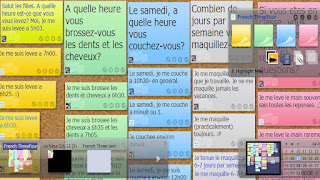
I teach French so I
used the canvases to review grammar with the kids. I asked them questions
and allowed them to answer the questions. To the left, you see a sample
canvas. This is one we did to review the reflexive verbs. My stickies
were larger, I started the collaboration. I had the kids color code to
match the question so it was easier for them to see what they had done so
far. Each sticky labels the collaborator so you can see who posted.
I also went to the student's stickies and made corrections. The one
thing I dislike is not being able to use more than one color for the
font. If I made corrections, it had to be in black.
So, what can you do
with this?
1. Exit slip/ warmup Use it to see what the
kids learned and picked up that day or the day prior. Have them login and
go as soon as class starts or a few minutes before end.
2. Review games. Make a whole bunch of
stickies that need to be matched up. Kids can work in groups and line up
the notes to make them work. You would have to have several canvases, however
since the collaborators can move things around and everyone working on it sees
it move.
3. Task management. Train students to create a
daily lino canvas that has tasks and such. Kids can keep it as a means of
organizing their day.
4. Research paper organization. As students work
on a paper, have them use the sticky notes as their note cards where they
detail the paper. They could do the first note as the MLA/ APA entry for
a works cited page and then each note of that color could be the information
for the paper.
5. Vocabulary Review. Have students create a
canvas for each chapter you study and require them to document the words being
studied. The cool thing, for the visual learner, is that you can insert
an image to the sticky. Color code again> First sticky is the word,
maybe the origin. Second sticky is a photo of the word, third is
definition, last maybe using it in a sentence. If you are reading a novel
in a lit class, this would be a great way to organize notes.
How many ways could
you see this being used?
Monday, July 16, 2012
I am going to flip my class
I have decided after a lot of research, reading and chatting with others, I am going to take a jump in the deep end and flip my class this year. I have spent numerous hours this summer talking to people on twitter, reading chats and reading blogs about the topic. As a little background information, I am a French teacher. I also run the school library. There are many times I am in the middle of class and someone stops in needing technology help. Yes, I have an aid, but sometimes the needs are things only I can do. I think if I flip my class, a three minute interruption won't impact the kids learning. I spend only a little bit of time each week doing lecture. I have found that a short intro of the topic to the whole class and then small pod lessons works best with my kids. I think what I am already doing is a little flipped, but, I intend to stop the in class lecture and move into the video mode.
I don't intend to make kids watch the videos at home unless they want to. Since French is not a core class, most kids don't do homework anyway. They often put it on the back burner to get their core work done. I can't compete with math, science and English. Both content areas often require a lot of night work and kids have so many other things to do outside of school. They spend seven hours a day at school. Why should they spend their entire evening doing more school work? Plus, I have to grade it.
Here is how I envision my class:
Kids will come in and log into Edmodo for their daily starter. (we are 1:1 so all students have a laptop.) I will be using today's meet or poll everywhere to do warmups. They will also see links to their videos. They will be instructed to download the video and be given their daily assignments. One of the assignments will be watching the video. While that is happening, I will be in small group talking to the students, using the target language and answering questions. As they watch the videos they will be taking notes which will be used for their grades. I also anticipate a lot of projects and group discussion in French. We are also going to be connecting with Francophone schools via skype and ePals. I see my kids gaining a lot of their knowledge through communication.
I am looking forward to trying this and seeing how it works.
I don't intend to make kids watch the videos at home unless they want to. Since French is not a core class, most kids don't do homework anyway. They often put it on the back burner to get their core work done. I can't compete with math, science and English. Both content areas often require a lot of night work and kids have so many other things to do outside of school. They spend seven hours a day at school. Why should they spend their entire evening doing more school work? Plus, I have to grade it.
Here is how I envision my class:
Kids will come in and log into Edmodo for their daily starter. (we are 1:1 so all students have a laptop.) I will be using today's meet or poll everywhere to do warmups. They will also see links to their videos. They will be instructed to download the video and be given their daily assignments. One of the assignments will be watching the video. While that is happening, I will be in small group talking to the students, using the target language and answering questions. As they watch the videos they will be taking notes which will be used for their grades. I also anticipate a lot of projects and group discussion in French. We are also going to be connecting with Francophone schools via skype and ePals. I see my kids gaining a lot of their knowledge through communication.
I am looking forward to trying this and seeing how it works.
Subscribe to:
Comments (Atom)


